
World Systems · Interactive field study
From Seed to Habitat
What changes when the robots change the ground?
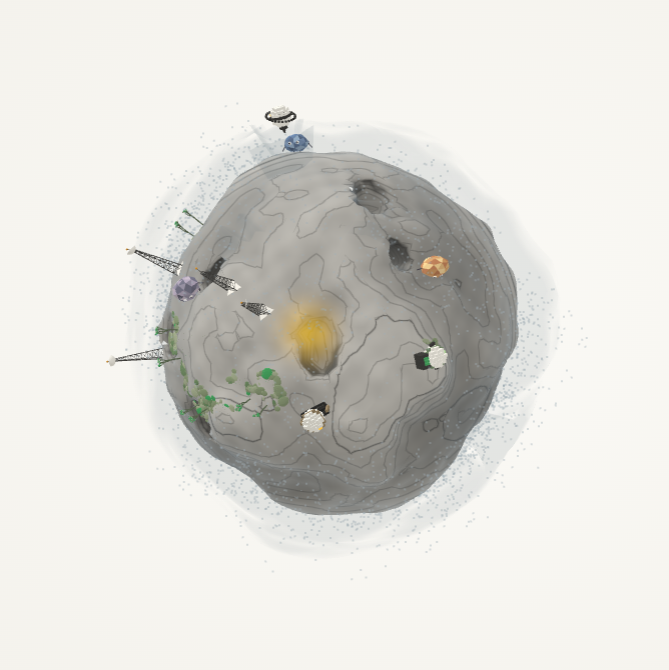
Watch a single planet change as robots mine, reshape the terrain, and make room for new life.
Explore the article →Land on small procedural planets, reshape them with a crew of robots, and see how the creatures that live there respond.
01 · What You Do
Orbit a procedural planet. Look at its material, terrain and mineral signals.
Set down on the surface. Deploy a Miner, Builder or Gardener, or dig, add and flatten by hand.
Follow the altered ground, new plants and residents’ reactions. Travel to another signal planet and try again.
Behind the Game
A small world makes the consequences of a small action visible. DENT explores how starting conditions, robot work and resident preferences produce different planetary outcomes.
Read the design intent ↗World Systems · Interactive field study
What changes when the robots change the ground?
Watch a single planet change as robots mine, reshape the terrain, and make room for new life.
Explore the article →Orbit, land and deploy the crew.
The playable loop ↓The field crew, the Drifter and local species.
Models & rig explorer ↓Terrain, habitats, roads and interplanetary exchange.
System Atlas ↓Material-dependent digging and surface sounds.
Read the sound implementation ↗The physical console design and prototype notes.
Console design notes ↗Voxel chunks and distance-based levels of detail.
From course ideas to code ↓The documented loop from discussion to practice.
Read the working method ↓02 · The field crew
Set a work area and let each specialist read the terrain, choose a task and leave a different mark behind. See the robot design board
Scans for minerals, drills a radial tunnel and carries each find back into storage.
scan → tunnel → collectSurveys flatter ground and grows vegetation where the surface can support it.
survey → plant → spreadSearches the high ground and raises antennas that extend the system’s reach.
survey → raise → signalCuts obstructions and fills damaged ground with soil recovered by the crew.
cut → fill → levelLoading the Drifter model…
The same 3D character used in the game. Turn it around, try an animation or reveal its joints. Open the rig details to inspect individual nodes and rotation curves.
03 · The residents
Five residents, at home on rock, metal, plastic, fur and ice. Hover or tap a portrait to see its signature action.
04 · System atlas
10 layers across 2 scales. Open a layer to explore its rules and current implementation. This is an architecture map, not live simulation data.
↳ Imported materials → local construction → habitat fit → residents stay or return home ↺
Planet scale · 7 layers
Noise · Density Field · Marching Cubes
Seeded volumes support digging, filling and flattening; dirty chunks rebuild with distance-based LOD.
Source · world/planet.ts; world/voxels/
Seeded Distribution · Surface Patches
Native materials and seeded deposits feed per-planet inventories. Imported material patches change local habitat fit.
Source · content/materials.ts; systems/inventory.ts; systems/patches.ts
Spatial Sampling · Growth Rules
Gardeners sample suitable ground; plants grow and spread. Riggers raise antennas, while spaceports unlock routes.
Source · systems/placer.ts; systems/structures.ts; systems/logistics.ts
Agent-Based Modeling · Habitat Suitability
Species read material, water, disturbance and company. Comfort and belonging guide settling or returning home.
Source · systems/residents.ts; systems/habitat.ts; content/species.ts
Neighborhood Search · Connected Components
Nearby homes of the same species form colonies through connected chains. These groups also become service destinations.
Source · systems/migration.ts → coloniesOf()
A* · Traffic Heatmap · Desire Paths
Service trips and walking residents add heat to surface edges. Busy paths wear into roads by themselves; residents start walks along a close road, roads lower travel cost and blocked routes replan.
Source · graph/surfaceGraph.ts; systems/traffic.ts
Task Allocation · Resource Accounting
Mining supplies local stock. Builders prioritize habitat patches and platforms before terrain work, spending available materials.
Source · systems/builder.ts; systems/inventory.ts
System scale · 3 layers
Graph Theory · Procedural Layout
Seeds fix planet positions. Visited worlds with spaceports can be joined by weighted, bidirectional routes.
Source · systems/system.ts; graph/graphCore.ts
Dijkstra · State Machine
Trains carry cargo and unique residents along shortest routes. Delivery, cancellation and passports preserve stock and identity.
Source · systems/logistics.ts; systems/creatures.ts; systems/migration.ts
Stock–Flow Accounting · Rule-Based Simulation
Shared credits pay for energy, edits, ports and routes. Stock and shipments connect worlds; dynamic markets and simultaneous planet simulation remain planned.
Source · systems/economy.ts; systems/simulation.ts; state/planets.ts
05 · Under the surface
Each lesson idea is a working part of the game. Open a row to follow it into the code.
Lesson 02 · TerrainBuild repeatable terrain variation. Each seed creates a reproducible planet silhouette.
fractalNoise3D Seed → 3D noise → uneven surface
planet.ts → createPlanetField()
Lesson 03 · VoxelsDescribe solid and empty space with volume samples, so terrain has an interior tools can reshape.
densityAt Samples throughout the planet → editable volume
planet.ts → PlanetWorld
Lesson 03 · VoxelsCombine or change fields to reshape a volume: remove terrain, build it up, or make a level patch.
brush edits Change local density → update the surface
planet.ts → PlanetWorld.edit()
Lesson 03 · VoxelsExtract a triangle surface from a density field. The planet above is meshed by the same code.
marchingCubes.js Density samples → isosurface → mesh
marchingCubes.js → PlanetView.tsx
Lesson 03 · VoxelsSplit a large volume into local regions; unchanged terrain stays in place while you shape a patch.
dirty chunks Brush edit → affected chunks → remesh
chunks.js → RemeshScheduler.tsx
Lesson 03 · VoxelsExpose the edges of a generated mesh. The detector reveals a local terrain wireframe and buried signals.
localWireframe Nearby terrain mesh → scan overlay
DetectorView.tsx
Lesson 04 · ShaderCombine surface treatment with spatial effects: stable terrain grain and distance-faded resource signals.
triplanar grain + distance fade World position → texture and signal glow
terrainMaterial.ts → distanceSignalMaterial.ts
Lesson 03 · VoxelsUse fewer mesh samples farther from the camera; nearby terrain stays detailed.
LOD 0 / 1 / 2 Camera distance → chunk detail → snapped seams
lodChunks.js → RemeshScheduler.tsx
Lesson 08 · BranchingGrow a plant by rewriting one branch into several. Young plants keep only the lower levels.
branchGeometries Four levels, two or three children → one merged plant
surfaceModels.ts
Terrain techniques are only the foundation. Explore the system atlas above for habitats, roads, logistics and the current economic model.
06 · How it is made
Every lesson follows the same loop. Hover a step for detail.
Start from the lecture notes and slides.
Talk through anything unclear with an LLM in one chat session.
The LLM drafts the write-up from the assignment, keeping plans apart from observed results.
Each step states one conclusion.
Build and check each step before starting the next.
The canvas shows a single parameter at a time, not a lab with every control.
Source is explained to be understood, not written from scratch.
A short same-idea, new-case question closes the step.